


Procare: Childcare App
4.610.38K Reviews
App Specs
- Version
- 6.6.0
- Updated On
- License
- Free
- Downloads
- 1,000,000+
- Developer
- Procare Solutions LLC
- Categories
- Education
- Platform
- Android, iOS
Screenshots
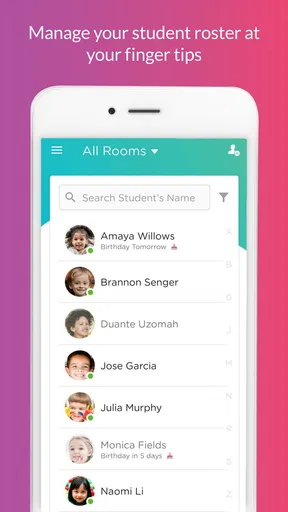
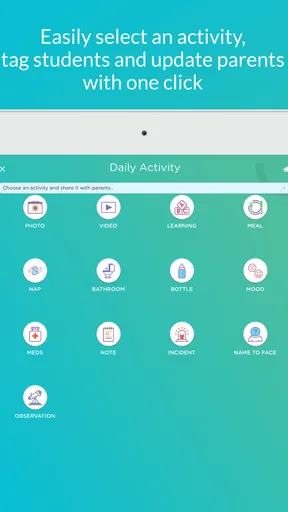
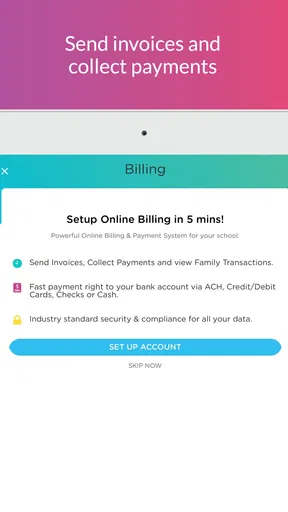
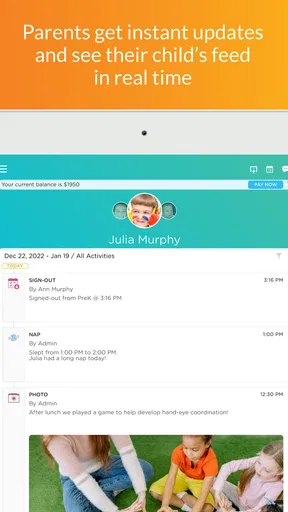
 Analysis by AppCompare
Let me tell you about my experience with the Procare: Childcare App. This app is a game-changer for parents and childcare providers alike. It's designed to streamline all those day-to-day tasks, making life a little bit easier for everyone involved. But before we jump into the details, let me break down my journey with this app.
What I found most useful was thinking of it not as another general-purpose family app, but as a shared working space for a childcare relationship. Its education focus is practical rather than lesson-based: the day-to-day needs are the handoff, the record of what happened, the message that needs a reply, and the bill that should not get lost in an inbox. Procare Solutions LLC develops the app, and that focus shapes who is likely to benefit most: families whose childcare provider already uses it, and staff who need to coordinate with enrolled families.
That distinction matters before you install it. A parent cannot get much from a childcare-management app if their center does not use the same system, while a provider may find it useful only if the families and staff are willing to keep information in one place. I would check with the center first about which parts it actually uses. A center may rely on daily updates and sign-in/out while handling other routines another way, so it is worth understanding the local workflow rather than assuming every tool will be active for every family.
Readable screens and a straightforward routine
One thing that stood out immediately was the clean and user-friendly interface. Everything is clearly labeled, so I didn’t have to dig around to find what I needed. The app’s intuitive design is perfect for those of us who aren’t exactly tech-savvy.
For accessibility in the everyday sense, clear labels and a familiar task structure are a helpful start: a caregiver can look for the relevant update or account task without learning a complicated set of menus. I would still treat “easy to navigate” as a personal experience, not a guarantee that the screen will suit everyone. People who depend on larger text, screen readers, voice control, or a particular contrast setting should try the app on their own device and check whether their usual settings make the important actions comfortable to use.
A useful habit is to decide with your provider which information belongs in the app and which needs a direct conversation. That keeps the screen from becoming a second, cluttered inbox. For example, a routine note about a child’s day may be easy to review later in the app, while a time-sensitive change to pickup plans is better confirmed through the channel the center tells you to use. The app can organize communication, but it does not remove the need for a clear agreement about urgent messages.
Getting Started with Procare
First things first, downloading the Procare: Childcare App was a breeze. It's available on both Android and iOS, so no matter what device you’re using, you’re covered. Once installed, the setup process was straightforward. You just create an account, add your personal details, and you’re ready to go.
Worth Reading Before You Choose

EA SPORTS FC Mobile 26 Is a Bigger Football Game, but It Takes Time

Flipboard Shows What News Apps Must Do Beyond the Feed

Switching to Android Auto Means Rethinking Your Driving Routine

Google Calendar Makes a Crowded Week Easier to Manage

Ludo King Makes the Most of the Minutes Between Plans

Baby Panda World Brings Quick Play to Modern Phones, but Its Game Library Feels Busy
The app is free, rated for Everyone, and its current version is 6.4.14; it requires operating system 11 at minimum. Those details are worth checking against the device you plan to use, especially if it is an older phone kept for childcare tasks. The app has been available since February 28, 2018, and its broad adoption—over one million installs, with an average rating of 4.6 from around fifty thousand ratings—suggests many families and childcare teams have encountered it. I would treat that as useful context, not proof that every center uses the same setup or that every family will find the interface equally comfortable.
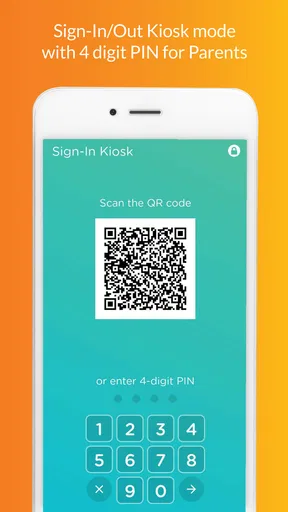
On a busy morning, the value of a shared routine becomes clearer. A parent can complete the arrival handoff and sign-in/out task as part of the same childcare workflow, rather than relying on a paper note that may be hard to find later. At pickup, a provider’s updates can help the parent understand how the day went, while account and billing tasks remain easier to revisit than a loose message thread. The practical win is less about any one screen and more about having predictable places for recurring childcare details.
Features That Make Life Easier
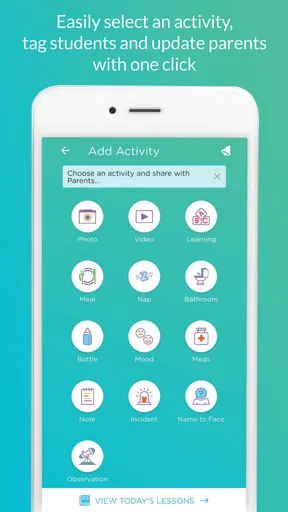
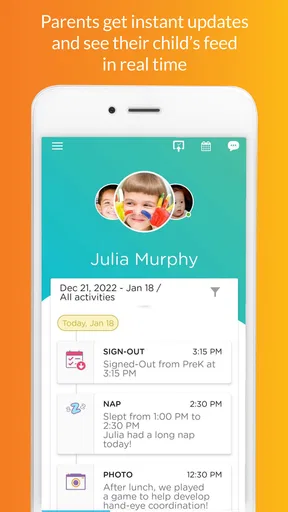
Now, let’s talk about the features. The app offers a plethora of tools that cater to both parents and childcare providers. For parents, it’s like having a personal assistant for your child’s daycare. You can check in and out, manage bills, and even get updates about your child’s activities throughout the day. How cool is that?
For childcare providers, the app allows for seamless communication with parents. You can send updates, photos, and even videos. It’s a fantastic way to keep parents in the loop and ensure transparency.
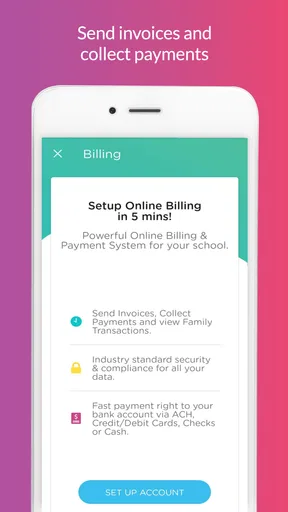
There’s also a robust billing system that simplifies payments. You can manage invoices, track payments, and even set up automatic billing, saving you a ton of time and hassle.
One less obvious benefit of keeping these tasks together is that it can reduce small mismatches between what a family remembers and what the center has recorded. Sign-in/out details, messages, and billing are different kinds of information, but they all matter during a busy week. I would still review an invoice rather than assuming that automation makes it correct: a convenient payment routine saves effort, while a quick check of amounts and dates helps catch a misunderstanding before it becomes a bigger conversation.
There is also a trade-off for staff. Sending updates and media from a shared system can make families feel closer to the daily routine, but it takes time and consistent habits from the people caring for children. A center that posts selectively may give parents a clearer, more useful picture than one that tries to document everything. For a parent, I would look for updates that answer practical questions about the day rather than expecting a constant stream of photos or video.
Staying Connected
One of my favorite aspects of the app is the messaging feature. It acts as a direct line between parents and providers. Whether it’s sharing a child’s achievements or discussing a concern, communication is quick and efficient. Plus, the app keeps a record of all messages, so you never miss a beat.
Another nifty feature is the calendar. It keeps track of events, holidays, and important dates, making planning a breeze. Whether you’re a parent trying to remember when the next parent-teacher meeting is or a provider organizing a field trip, the calendar has got you covered.
For a family managing changing schedules, the calendar can work best as a prompt to prepare, not as a substitute for checking a detail that affects care. I would confirm unusual pickup arrangements or a last-minute change directly with the center, even if a message has been sent, because the person receiving the child needs to have the information in time. Likewise, if two caregivers share responsibility, agreeing who checks messages and calendar items avoids the assumption that someone else has already seen them.
Compared with the common alternative of separate texts, paper notices, and a payment portal, a childcare-specific app has the advantage of keeping recurring center-related tasks in a more organized context. The trade-off is dependence on the provider’s chosen system and on families remembering to check it. A basic calendar or messaging app may be enough for a small informal arrangement, or for a provider that does not use Procare. For a center already using it to coordinate care, switching among unrelated tools can create more friction than it removes.
Motor and sensory needs in everyday use
Touchscreens can be awkward when someone is carrying a bag, helping a child get ready, or trying to finish a handoff quickly. In those moments, I would avoid treating a phone task as something to complete while moving through a doorway or supervising several children. A calmer moment is better for checking a message, reviewing a bill, or making sure the sign-in/out step is complete. That is a simple workflow choice, but it can make the app more usable for people who find precise tapping or divided attention difficult.
Families also differ in how much screen-based communication feels comfortable. Frequent notifications or a steady flow of media can be reassuring for one parent and distracting for another. I would set expectations with the center about what kinds of updates are normally sent and when they should be checked, rather than relying on the app to fit every sensory preference automatically. Providers can help by making messages concise and using a predictable routine, while parents can choose a manageable time to catch up instead of checking constantly.
For a caregiver with limited dexterity or visual fatigue, the most important test is not whether the app looks simple at first glance, but whether the particular actions they need are manageable on their phone. A family member can help with initial setup if that is useful, but the person who will routinely handle arrival, messages, and billing should try the workflow themselves. If those tasks remain difficult, a center’s staff may be able to explain an alternative process for the relevant step.
Safety and Privacy
In today’s digital age, safety and privacy are paramount. The app takes this seriously, offering secure login options and ensuring that all data is encrypted. As a parent, knowing that my child’s information is protected gives me peace of mind.
Providers also have control over who sees what, ensuring that sensitive information is only accessible to those who need it. It’s clear that the developers have put a lot of thought into making the app both functional and secure.
Even with a shared system, I would keep everyday account habits in mind: use a device lock, avoid leaving a signed-in phone where others can access it, and check carefully before sharing a child-related photo or message. These are sensible steps for any service that holds family information. If several adults need access, each should follow the center’s account guidance rather than passing around one person’s login, so responsibility for messages and account actions stays clear.
When another approach may suit you better
Procare is most appealing when the childcare provider actively uses it and the family wants one place for routine communication and administrative tasks. It is less compelling for a parent who only needs occasional contact with a caregiver, or for a small care arrangement that already runs smoothly through direct conversation. In those cases, adding another account and another place to check may create busywork instead of reducing it.
It may also be a poor fit if a family member cannot comfortably use the available phone interface and the provider has no workable way to support that person’s needs. I would not make the app the only route for essential information until the family and center agree that messages, arrival procedures, and account tasks can be handled reliably. The best system is the one that works for the people responsible for the child, including relatives who may not be confident smartphone users.
Final Thoughts
Overall, my experience with the Procare: Childcare App has been overwhelmingly positive. It’s a comprehensive tool that makes managing childcare a whole lot easier. Whether you’re a busy parent or a dedicated childcare provider, this app has something to offer.
It’s the little things, like receiving a snapshot of your child’s day or having an easy way to pay bills, that make a big difference. If you’re looking for a reliable way to manage childcare, I highly recommend giving this app a try. It’s like having an extra set of hands to help manage your busy life.
So, what are you waiting for? Dive into the world of Procare and see how it can transform your childcare experience. Trust me, you won’t regret it!
My recommendation comes with one practical condition: ask your childcare provider how it uses the app before making it part of your family routine. If staff and parents share the same expectations for sign-in/out, updates, messages, and billing, it can reduce the scatter of childcare information across paper, texts, and separate payment tasks. If those expectations are unclear, settle them first; no app can fix a communication routine that the people using it have not agreed on.
For families who need a more accessible way to manage childcare, I would test the exact tasks that matter most rather than judging from the first screen. Can the person responsible comfortably find a daily update, read a message, and handle the arrival or account step they need? If so, Procare can be a useful bridge between home and center. If not, ask the provider to discuss a different route for essential information. I see it as a worthwhile option for a center-based routine, not a universal replacement for personal communication or an answer to every access need.
Pros
- User-friendly interface for easy navigation.
- Real-time updates on child activities.
- Secure messaging between parents and staff.
- Customizable reports for tracking progress.
- Cloud-based data storage for easy access.
Cons
- Subscription required for premium features.
- Limited offline functionalities.
- Initial setup can be time-consuming.
- Occasional app crashes reported.
- Some features require strong internet connection.
FAQs for Procare: Childcare App
What is Procare: Childcare App used for?
Procare: Childcare App is designed for parents and childcare providers to manage daily activities, track children's progress, and communicate efficiently. It offers features like attendance tracking, billing management, and instant messaging, making it an essential tool for streamlining childcare operations and enhancing parental engagement.
Is Procare: Childcare App secure for storing sensitive information?
Yes, Procare: Childcare App prioritizes data security with robust encryption protocols to protect sensitive information. It complies with industry standards and regulations, ensuring that all personal and financial data is stored securely, giving users peace of mind when managing childcare details.
Can I access Procare: Childcare App on multiple devices?
Absolutely. Procare: Childcare App is available on both Android and iOS platforms, allowing users to access their accounts from multiple devices. This flexibility ensures that parents and providers can stay connected and manage childcare tasks anytime, anywhere, with seamless synchronization across devices.
Does Procare: Childcare App offer customer support?
Yes, Procare provides comprehensive customer support to assist users with any issues or inquiries. Support options include a help center with FAQs, email support, and live chat. This ensures that users can get timely assistance, making their experience with the app smooth and problem-free.
Are there any costs associated with using Procare: Childcare App?
Procare offers various pricing plans depending on the features and number of users needed. While there may be a free version with limited functionality, premium plans provide full access to advanced features. It's advisable to review the pricing details on their website to choose a plan that best fits your needs.


